Transferring API Ownership
You can transfer APIs to organizations in Swagger Studio. The user is an owner in both organizations, so they can revert the API ownership if needed.
When you add an API to an additional project, Swagger Studio shows a warning so that you can confirm the change. This recommendation also applies to templates.
Permissions required to transfer ownership
Transfer direction | Permissions required |
|---|---|
From an organization | Organization owner |
To an organization | Organization owner |
Transfer ownership
To transfer an API to an organization, do the following:
Open the API in the Swagger Studio editor.
Click the API name. This opens the API info panel.
Click
 Manage Owner & Project.
Select the organization that you want to transfer the API to.
Note
Only organization owners can transfer APIs and can view the Assign Organization option. For organizations where you do not have owner access, the Assign Organization option is disabled.
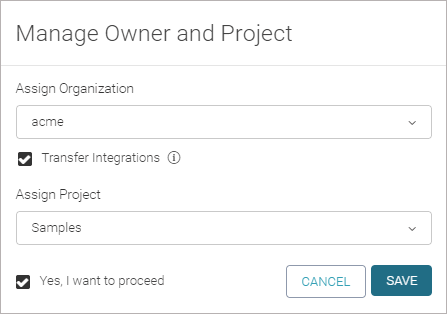
If the API has integrations configured, you can select the Transfer Integrations check box to transfer the API along with the integrations.
Note
This will give the new owner access to the integration settings, including access tokens.
(Optional.) Select a project to add this API to. The list contains existing projects that you are a member of.
Tip
You can link an API to multiple projects. However, to make the best use of Swagger Studio features, we recommend assigning each API to a single project.
Use the same approach for templates.
Select the Yes, I want to proceed checkbox.
Click Save.